
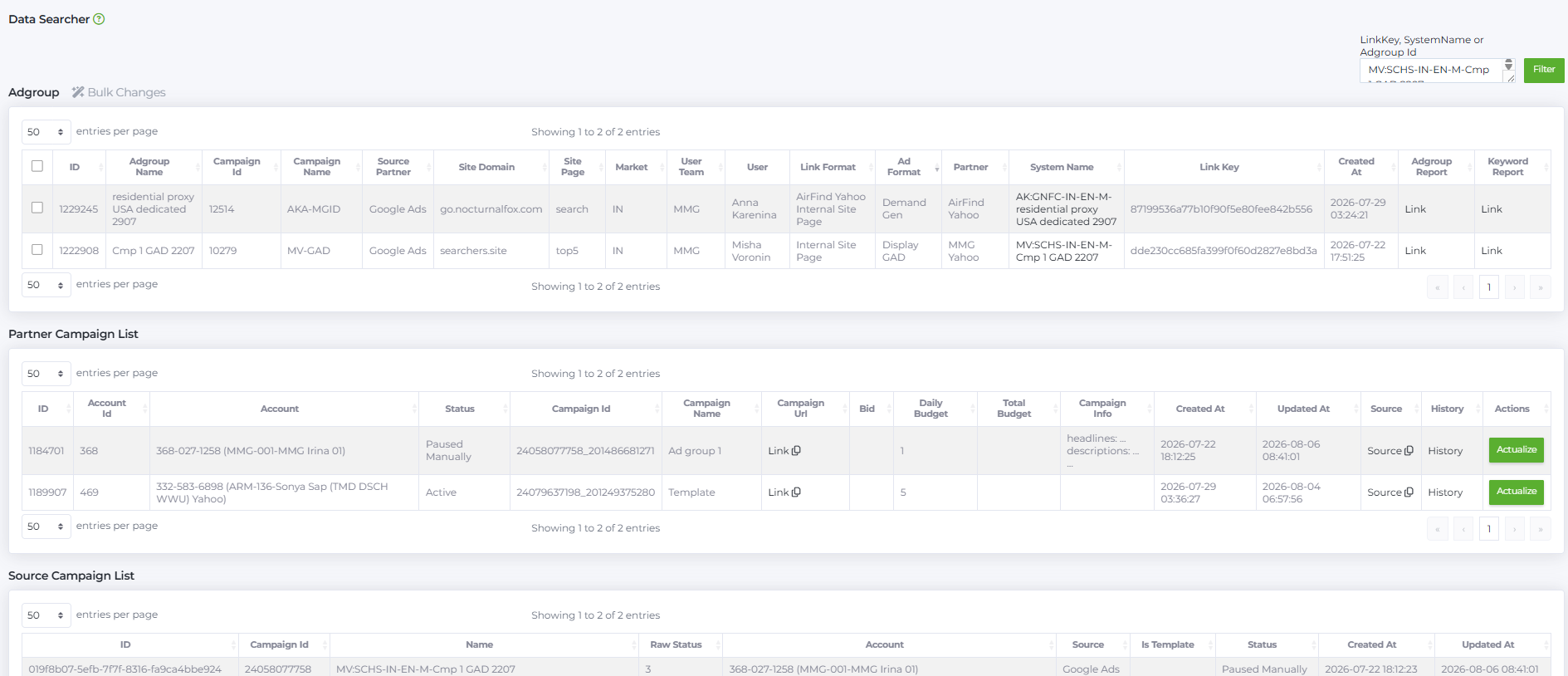
Data Searcher is a tool for quickly viewing general information about ad groups.
Data Searcher consists of three tables:
- Adgroup
- Partner Campaign List
- Source Campaign List
How to get started
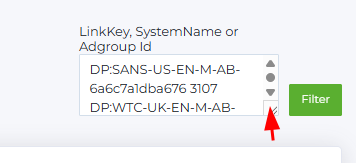
In the field LinkKey, SystemName or Adgroup Id, enter one of the suggested values to search. For bulk viewing, you can enter multiple values vertically (one per line) — the field can be resized by dragging its bottom-right corner. After entering the values, click Filter, and the information will be displayed based on your selection.
Adgroup Table
Displays general information about ad groups created in the Babkee system. The data is similar to what is shown in the Adgroup Report.

You can select one or multiple ad groups using checkboxes and apply bulk actions via the Bulk Changes button.
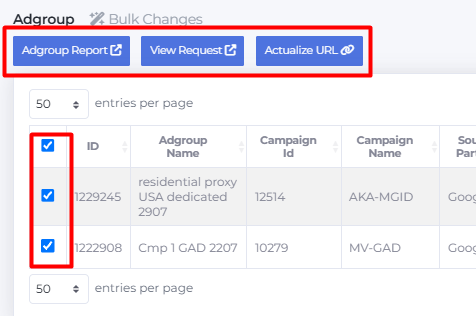
- The Adgroup Report button opens the Adgroup Report for the selected ad groups on one page.
- The Actualize URL button updates the channel linked to the ad group if it has changed or is incorrect. For example, if the original channel was disconnected, the ad group connected to a new channel, but the source data was not updated — this button will fix and synchronize the channel.
- The View Requests button opens the Campaign Generator View Request page for the selected ad groups. If the selected ad groups relate to the same query, one page with this query opens in a new window. If the ad groups belong to different queries, then a separate page with the corresponding query will open for each ad group.
Columns:
- ID: internal ad group identifier in the system.
- Adgroup Name: ad group name, usually containing description and launch date.
- Campaign ID: internal campaign identifier (folder).
- Campaign name: a folder name for campaigns, set by the user.
- Source Partner: name of the traffic source partner.
- Site Domain: domain of the site receiving traffic.
- Site Page: landing page for the ad on a specific site.
- Market: list of countries (also called market or geo), using international country codes.
- User Team: list of user teams registered in the system.
- User: list of users registered in the system.
- Link Format: default link format used for the selected partner, traffic source, and site combination. It may be one or several formats and often includes partner and source names. This parameter defines how links are generated and displayed within the campaign settings.
- Ad Format: ad format.
- Partner: partner name to whom the traffic is sold.
- System Name: campaign name in Babkee, formatted as BuyerInitials:Website-Markets-Device-Languages-AdgroupName.
- Link Key: unique string identifier of the ad group.
- Created at: ad group creation date.
- Adgroup Report: link to the ad group report.
- Keyword Report: link to the keyword report.
Partner Campaign List Table
Shows information about advertising campaigns on the traffic source side.
Note: The order of PCLs here may not match the Adgroup table order. To check if an ad group has a PCL, it’s better to use the Adgroup List tool.

Columns:
- ID: internal PCL identifier in the system.
- Account ID: account identifier on the traffic source side.
- Account: account number and name.
- Status: campaign status.
- Campaign ID: unique campaign identifier embedded in the campaign URL; in Partner Campaign List it's a combination of two levels {campaign_id}_{adgroup_id} from the source (mainly for technical use).
- Campaign name: ad group name in the campaign.
- Campaign URL: link to the campaign.
- Bid: maximum bid set by the buyer; if empty, the campaign uses Max Conversion strategy.
- Daily Budget: maximum daily campaign budget; upon reaching, the source pauses the campaign.
- Total Budget: total campaign budget; upon reaching, the source pauses the campaign (not supported for Facebook in Google Ads).
- Campaign info: technical info for support.
- Created at: ad group creation date.
- Updated at: last update date.
- Source: link to the traffic source.
- History: ad group history.
- Actions: allows updating the campaign URL.
Source Campaign List Table
Displays information about campaigns and whether the campaign is marked as a template.

Columns:
- ID: campaign-level identifier on the source side.
- Campaign ID: unique campaign identifier embedded in the campaign URL.
- Name: campaign name in Babkee.
- Raw Status: status received from the source (technical info).
- Account: account number and name.
- Source: traffic source name.
- Is Template: whether the ad group is a template or not.
- Status: campaign status.
- Created at: creation date.
- Updated at: last update date.
Below the tables, you can see the total number of campaigns and how many are displayed on the current page. For convenience, you can select the number of rows per page: 10, 25, 50, 100, 250, 500, 1000, or 2500.
